# FSS-Mini-RAG  > **A lightweight, educational RAG system that actually works**
> *Built for beginners who want results, and developers who want to understand how RAG really works*
## Demo
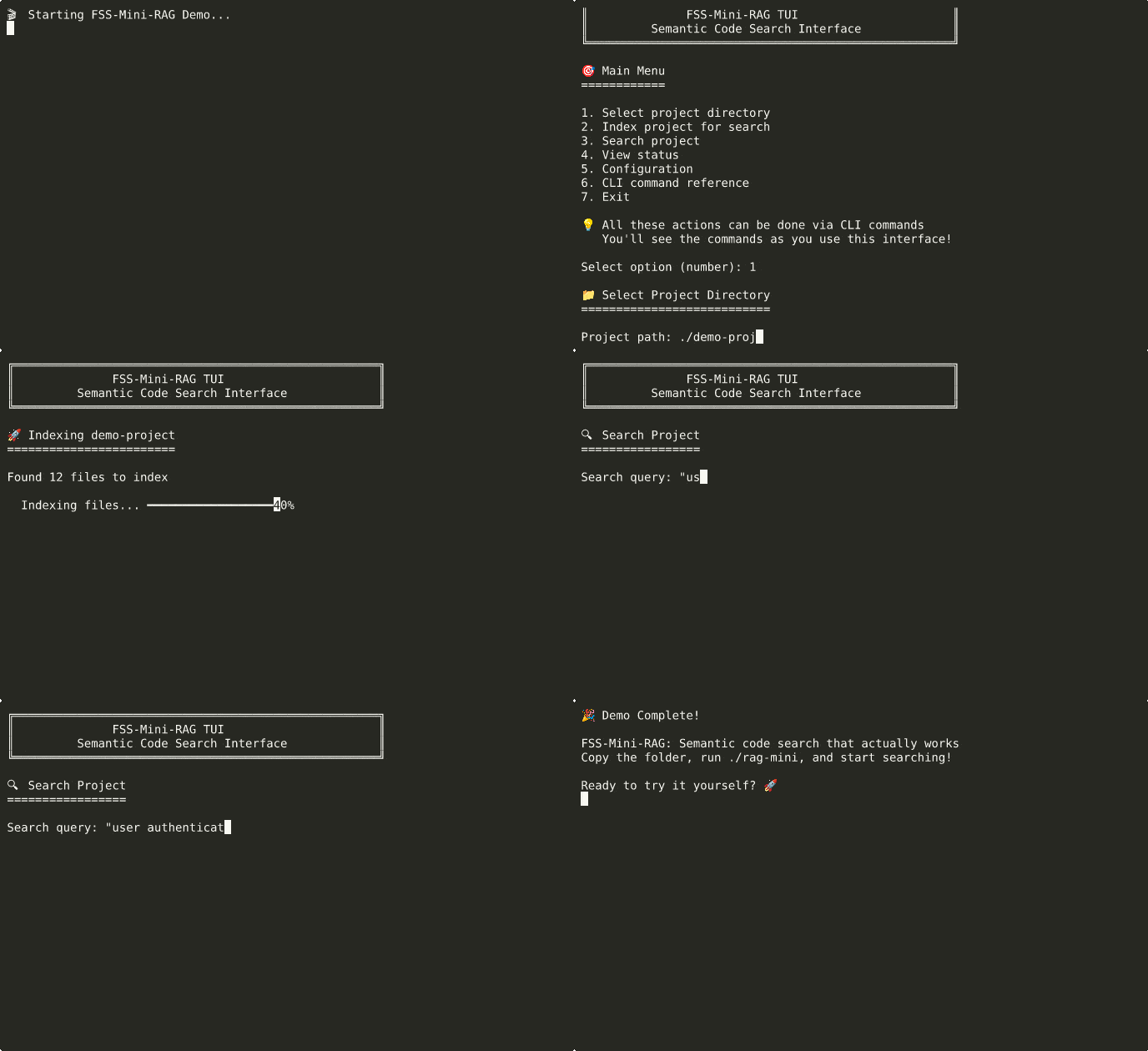
*See it in action: index a project and search semantically in seconds*
## How It Works
```mermaid
flowchart TD
Start([🚀 Start FSS-Mini-RAG]) --> Interface{Choose Interface}
Interface -->|Beginners| TUI[🖥️ Interactive TUI
> **A lightweight, educational RAG system that actually works**
> *Built for beginners who want results, and developers who want to understand how RAG really works*
## Demo

*See it in action: index a project and search semantically in seconds*
## How It Works
```mermaid
flowchart TD
Start([🚀 Start FSS-Mini-RAG]) --> Interface{Choose Interface}
Interface -->|Beginners| TUI[🖥️ Interactive TUI
./rag-tui]
Interface -->|Power Users| CLI[⚡ Advanced CLI
./rag-mini ]
TUI --> SelectFolder[📁 Select Folder to Index]
CLI --> SelectFolder
SelectFolder --> Index[🔍 Index Documents
Creates searchable database]
Index --> Ready{📚 Ready to Search}
Ready -->|Quick Answers| Search[🔍 Search Mode
Fast semantic search]
Ready -->|Deep Analysis| Explore[🧠 Explore Mode
AI-powered analysis]
Search --> SearchResults[📋 Instant Results
Ranked by relevance]
Explore --> ExploreResults[💬 AI Conversation
Context + reasoning]
SearchResults --> More{Want More?}
ExploreResults --> More
More -->|Different Query| Ready
More -->|Advanced Features| CLI
More -->|Done| End([✅ Success!])
CLI -.->|Full Power| AdvancedFeatures[⚡ Advanced Features:
• Batch processing
• Custom parameters
• Automation scripts
• Background server]
style Start fill:#e8f5e8,stroke:#4caf50,stroke-width:2px
style CLI fill:#fff9c4,stroke:#f57c00,stroke-width:3px
style AdvancedFeatures fill:#fff9c4,stroke:#f57c00,stroke-width:2px
style Search fill:#e3f2fd,stroke:#2196f3,stroke-width:2px
style Explore fill:#f3e5f5,stroke:#9c27b0,stroke-width:2px
style End fill:#e8f5e8,stroke:#4caf50,stroke-width:2px
```
## What This Is
FSS-Mini-RAG is a distilled, lightweight implementation of a production-quality RAG (Retrieval Augmented Generation) search system. Born from 2 years of building, refining, and tuning RAG systems - from enterprise-scale solutions handling 14,000 queries/second to lightweight implementations that anyone can install and understand.
**The Problem This Solves**: Most RAG implementations are either too simple (poor results) or too complex (impossible to understand and modify). This bridges that gap.
## Two Powerful Modes
FSS-Mini-RAG offers **two distinct experiences** optimized for different use cases:
### 🚀 **Synthesis Mode** - Fast & Consistent
```bash
./rag-mini search ~/project "authentication logic" --synthesize
```
- **Perfect for**: Quick answers, code discovery, fast lookups
- **Speed**: Lightning fast responses (no thinking overhead)
- **Quality**: Consistent, reliable results
### 🧠 **Exploration Mode** - Deep & Interactive
```bash
./rag-mini explore ~/project
> How does authentication work in this codebase?
> Why is the login function slow?
> What security concerns should I be aware of?
```
- **Perfect for**: Learning codebases, debugging, detailed analysis
- **Features**: Thinking-enabled LLM, conversation memory, follow-up questions
- **Quality**: Deep reasoning with full context awareness
## Quick Start (2 Minutes)
**Step 1: Install**
```bash
# Clone the repository
git clone https://github.com/FSSCoding/Fss-Mini-Rag.git
cd Fss-Mini-Rag
# Install dependencies and package
python3 -m venv .venv
source .venv/bin/activate # Linux/macOS
# .venv\Scripts\activate # Windows
# Use python -m pip for reliability (handles externally-managed-environment errors)
python -m pip install -r requirements.txt
python -m pip install .
```
**If you get "externally-managed-environment" error:**
```bash
# Verify virtual environment is active
which python # Should show .venv/bin/python
python -m pip --version # Should show .venv path
# If still failing, use override (safe in virtual environment)
python -m pip install -r requirements.txt --break-system-packages
python -m pip install . --break-system-packages
```
**Step 2: Start Using**
```bash
# Navigate to any project and search
cd ~/my-project
rag-mini init . # Index current project
rag-mini search . "authentication logic"
# Or use the legacy interface
./rag-tui # Interactive interface
```
That's it. No external dependencies, no configuration required, no PhD in computer science needed.
## What Makes This Different
### For Beginners
- **Just works** - Zero configuration required
- **Multiple interfaces** - TUI for learning, CLI for speed
- **Educational** - Shows you CLI commands as you use the TUI
- **Solid results** - Finds code by meaning, not just keywords
### For Developers
- **Hackable** - Clean, documented code you can actually modify
- **Configurable** - YAML config for everything, or change the code directly
- **Multiple embedding options** - Ollama, ML models, or hash-based
- **Production patterns** - Streaming, batching, error handling, monitoring
### For Learning
- **Complete technical documentation** - How chunking, embedding, and search actually work
- **Educational tests** - See the system in action with real examples
- **No magic** - Every decision explained, every component documented
## Usage Examples
### Find Code by Concept
```bash
./rag-mini search ~/project "user authentication"
# Finds: login functions, auth middleware, session handling, password validation
```
### Natural Language Queries
```bash
./rag-mini search ~/project "error handling for database connections"
# Finds: try/catch blocks, connection pool error handlers, retry logic
```
### Development Workflow
```bash
./rag-mini index ~/new-project # Index once
./rag-mini search ~/new-project "API endpoints" # Search as needed
./rag-mini status ~/new-project # Check index health
```
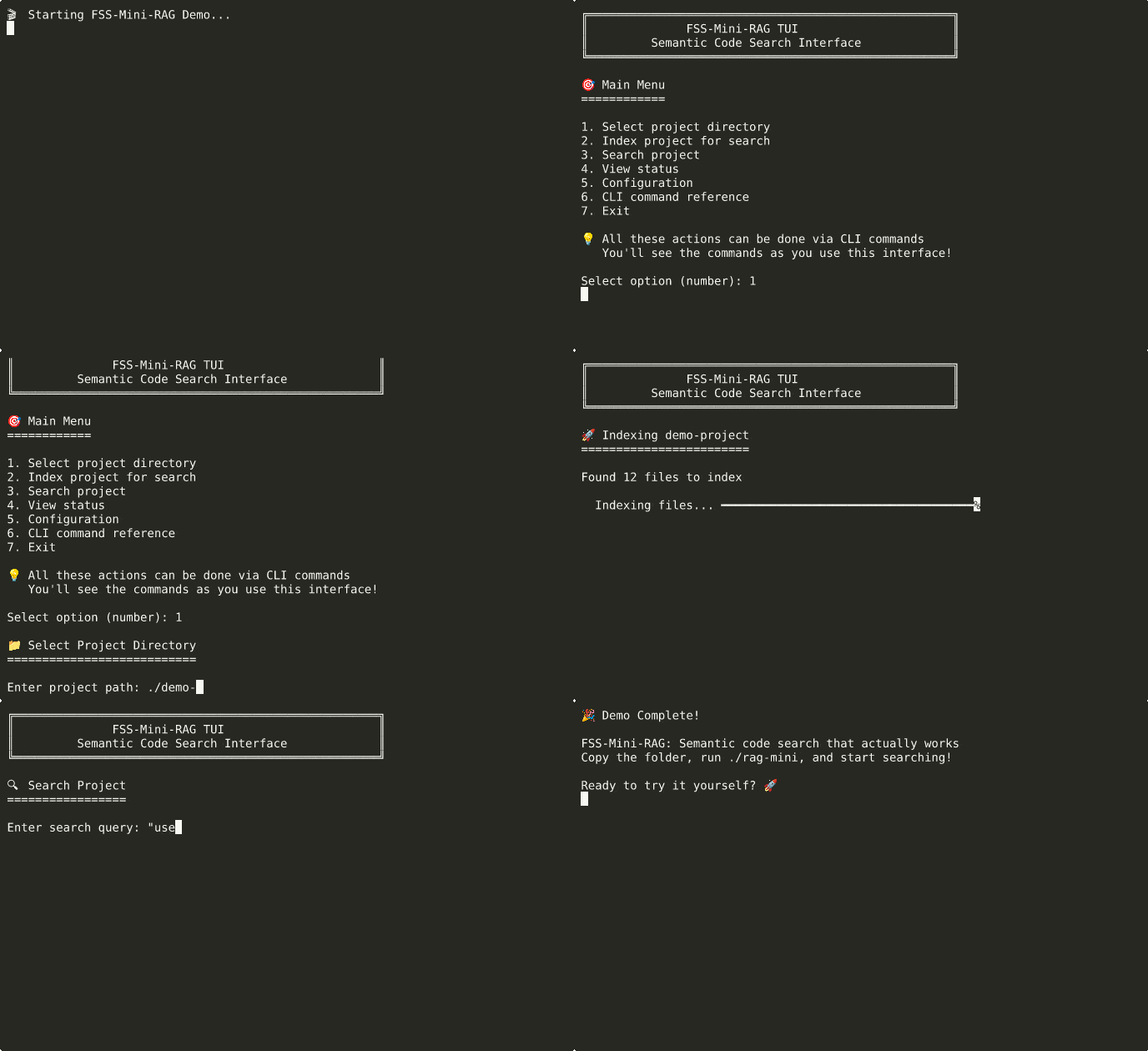
*Advanced usage: semantic search with synthesis and exploration modes*
## Installation Options
### 🎯 Copy & Paste Installation (Guaranteed to Work)
Perfect for beginners - these commands work on any fresh Ubuntu, Windows, or Mac system:
**Fresh Ubuntu/Debian System:**
```bash
# Install required system packages
sudo apt update && sudo apt install -y python3 python3-pip python3-venv git curl
# Clone and setup FSS-Mini-RAG
git clone https://github.com/FSSCoding/Fss-Mini-Rag.git
cd Fss-Mini-Rag
# Create isolated Python environment
python3 -m venv .venv
source .venv/bin/activate
# Install Python dependencies
pip install -r requirements.txt
# Optional: Install Ollama for best search quality (secure method)
curl -fsSL https://ollama.com/install.sh -o /tmp/ollama-install.sh
# Verify it's a shell script (basic safety check)
file /tmp/ollama-install.sh | grep -q "shell script" && chmod +x /tmp/ollama-install.sh && /tmp/ollama-install.sh
rm -f /tmp/ollama-install.sh
ollama serve &
sleep 3
ollama pull nomic-embed-text
# Ready to use!
./rag-mini index /path/to/your/project
./rag-mini search /path/to/your/project "your search query"
```
**Fresh CentOS/RHEL/Fedora System:**
```bash
# Install required system packages
sudo dnf install -y python3 python3-pip python3-venv git curl
# Clone and setup FSS-Mini-RAG
git clone https://github.com/FSSCoding/Fss-Mini-Rag.git
cd Fss-Mini-Rag
# Create isolated Python environment
python3 -m venv .venv
source .venv/bin/activate
# Install Python dependencies
pip install -r requirements.txt
# Optional: Install Ollama for best search quality (secure method)
curl -fsSL https://ollama.com/install.sh -o /tmp/ollama-install.sh
# Verify it's a shell script (basic safety check)
file /tmp/ollama-install.sh | grep -q "shell script" && chmod +x /tmp/ollama-install.sh && /tmp/ollama-install.sh
rm -f /tmp/ollama-install.sh
ollama serve &
sleep 3
ollama pull nomic-embed-text
# Ready to use!
./rag-mini index /path/to/your/project
./rag-mini search /path/to/your/project "your search query"
```
**Fresh macOS System:**
```bash
# Install Homebrew (if not installed)
/bin/bash -c "$(curl -fsSL https://raw.githubusercontent.com/Homebrew/install/HEAD/install.sh)"
# Install required packages
brew install python3 git curl
# Clone and setup FSS-Mini-RAG
git clone https://github.com/FSSCoding/Fss-Mini-Rag.git
cd Fss-Mini-Rag
# Create isolated Python environment
python3 -m venv .venv
source .venv/bin/activate
# Install Python dependencies
pip install -r requirements.txt
# Optional: Install Ollama for best search quality (secure method)
curl -fsSL https://ollama.com/install.sh -o /tmp/ollama-install.sh
# Verify it's a shell script (basic safety check)
file /tmp/ollama-install.sh | grep -q "shell script" && chmod +x /tmp/ollama-install.sh && /tmp/ollama-install.sh
rm -f /tmp/ollama-install.sh
ollama serve &
sleep 3
ollama pull nomic-embed-text
# Ready to use!
./rag-mini index /path/to/your/project
./rag-mini search /path/to/your/project "your search query"
```
**Fresh Windows System:**
```cmd
REM Install Python (if not installed)
REM Download from: https://python.org/downloads (ensure "Add to PATH" is checked)
REM Install Git from: https://git-scm.com/download/win
REM Clone and setup FSS-Mini-RAG
git clone https://github.com/FSSCoding/Fss-Mini-Rag.git
cd Fss-Mini-Rag
REM Create isolated Python environment
python -m venv .venv
.venv\Scripts\activate.bat
REM Install Python dependencies
pip install -r requirements.txt
REM Optional: Install Ollama for best search quality
REM Download from: https://ollama.com/download
REM Run installer, then:
ollama serve
REM In new terminal:
ollama pull nomic-embed-text
REM Ready to use!
rag.bat index C:\path\to\your\project
rag.bat search C:\path\to\your\project "your search query"
```
**What these commands do:**
- **System packages**: Install Python 3.8+, pip (package manager), venv (virtual environments), git (version control), curl (downloads)
- **Clone repository**: Download FSS-Mini-RAG source code to your computer
- **Virtual environment**: Create isolated Python space (prevents conflicts with system Python)
- **Dependencies**: Install required Python libraries (pandas, numpy, lancedb, etc.)
- **Ollama (optional)**: AI model server for best search quality - works offline and free
- **Model download**: Get high-quality embedding model for semantic search
- **Ready to use**: Index any folder and search through it semantically
### ⚡ For Agents & CI/CD: Headless Installation
Perfect for automated deployments, agents, and CI/CD pipelines:
**Linux/macOS:**
```bash
./install_mini_rag.sh --headless
# Automated installation with sensible defaults
# No interactive prompts, perfect for scripts
```
**Windows:**
```cmd
install_windows.bat --headless
# Automated installation with sensible defaults
# No interactive prompts, perfect for scripts
```
**What headless mode does:**
- Uses existing virtual environment if available
- Installs core dependencies only (light mode)
- Downloads embedding model if Ollama is available
- Skips interactive prompts and tests
- Perfect for agent automation and CI/CD pipelines
### 🚀 Recommended: Full Installation
**Linux/macOS:**
```bash
./install_mini_rag.sh
# Handles Python setup, dependencies, optional AI models
```
**Windows:**
```cmd
install_windows.bat
# Handles Python setup, dependencies, works reliably
```
### Manual Setup
**Linux/macOS:**
```bash
python3 -m venv .venv
source .venv/bin/activate
pip install -r requirements.txt
```
**Windows:**
```cmd
python -m venv .venv
.venv\Scripts\activate.bat
pip install -r requirements.txt
```
**Note**: The experimental copy & run feature is provided for convenience but may fail on some systems. If you encounter issues, use the full installer for reliable setup.
## System Requirements
- **Python 3.8+** (installer checks and guides setup)
- **Optional: Ollama** (for best search quality - installer helps set up)
- **Fallback: Works without external dependencies** (uses built-in embeddings)
## Project Philosophy
This implementation prioritizes:
1. **Educational Value** - You can understand and modify every part
2. **Practical Results** - Actually finds relevant code, not just keyword matches
3. **Zero Friction** - Works out of the box, configurable when needed
4. **Real-world Patterns** - Production techniques in beginner-friendly code
## What's Inside
- **Hybrid embedding system** - Ollama → ML → Hash fallbacks
- **Smart chunking** - Language-aware code parsing
- **Vector + keyword search** - Best of both worlds
- **Streaming architecture** - Handles large codebases efficiently
- **Multiple interfaces** - TUI, CLI, Python API, server mode
## Next Steps
- **New users**: Run `./rag-tui` (Linux/macOS) or `rag.bat` (Windows) for guided experience
- **Developers**: Read [`TECHNICAL_GUIDE.md`](docs/TECHNICAL_GUIDE.md) for implementation details
- **Contributors**: See [`CONTRIBUTING.md`](CONTRIBUTING.md) for development setup
## Documentation
- **[Getting Started](docs/GETTING_STARTED.md)** - Get running in 5 minutes
- **[Visual Diagrams](docs/DIAGRAMS.md)** - 📊 System flow charts and architecture diagrams
- **[TUI Guide](docs/TUI_GUIDE.md)** - Complete walkthrough of the friendly interface
- **[Technical Guide](docs/TECHNICAL_GUIDE.md)** - How the system actually works
- **[Troubleshooting](docs/TROUBLESHOOTING.md)** - Fix common issues
- **[Beginner Glossary](docs/BEGINNER_GLOSSARY.md)** - Friendly terms and concepts
## License
MIT - Use it, learn from it, build on it.
---
*Built by someone who got frustrated with RAG implementations that were either too simple to be useful or too complex to understand. This is the system I wish I'd found when I started.*